IFC / Revit-derived BIM → Web, Mobile, XR & Digital Twins
Transform BIM geometry and semantics into optimized 3D assets and structured, application-ready data — through one cloud pipeline and one API.
BIM models live inside heavy, desktop-bound formats. Direct Revit/IFC support on the web, on mobile, and inside AR/VR headsets is difficult, slow, or unavailable — so teams spend significant engineering effort just to extract a viewable model and its data before they can build anything.
A single, staged pipeline removes that friction.
Revit (.rvt), IFC (.ifc) or glTF/GLB via dashboard or REST.
Geometry is parsed and optimised; semantics are extracted.
Live job status, stage-by-stage progress and processing logs.
Optimised GLB/GLTF plus structured metadata JSON.
Build on the REST API, or compare two models side-by-side.
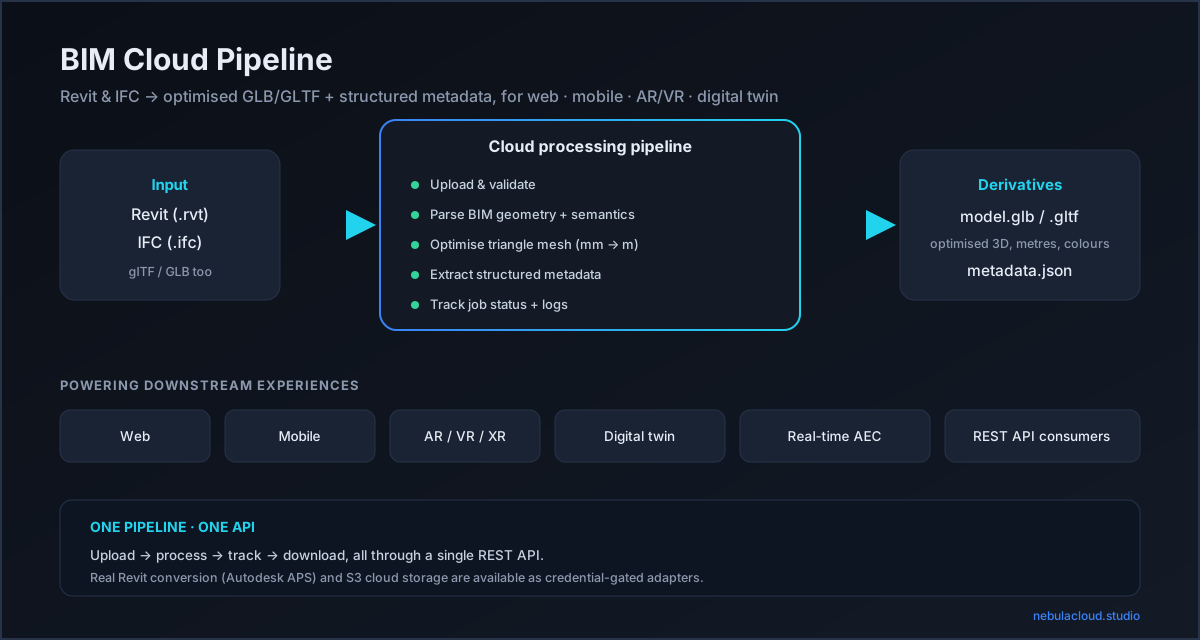
.rvt → Autodesk APS Model Derivative → an IFC
derivative → the native IFC pipeline → GLB/GLTF + metadata. Live RVT conversion is disabled in the public POC
(Autodesk APS quota); the adapter is documented for local / bring-your-own-credentials use. An uploaded file is
never replaced by a sample.The full workflow — Architecture sample → 3D + metadata → Structural sample → compare → download.
A self-contained, optimised 3D derivative and a structured metadata JSON — both produced from the same parse, so geometry and semantics stay consistent.
17 KB binary glTF · 270 triangles · metres · per-element colours.
Opens in Three.js, <model-viewer>, Blender, Unity/Unreal, AR Quick Look.
The visual mesh. Analytical volumes (spaces, zones) and geo-reference proxies are excluded so the model renders cleanly. Units are metres (glTF standard), with per-element material colours.
The semantic record. Elements carry GlobalId, category,
material, property sets (Pset_*), quantities (Qto_*) and spatial
containment — everything you need to query the building, not just look at it.
Run both bundled buildingSMART samples and compare them. Same house, two discipline views — the structural model swaps walls/slabs for beams and footings.
| Category | Architecture | Structural | Δ |
|---|---|---|---|
| beam | 0 | 6 | +6 |
| wall | 4 | 4 | — |
| slab | 3 | 0 | −3 |
| footing | 0 | 1 | +1 |
| discrete accessory | 0 | 2 | +2 |
| chimney · roof | 2 | 2 | — |
Element diff: 4 common · 14 added · 15 removed
across the two discipline models — the same diff is available via GET /api/compare/{idA}/{idB}.
A review portal for project stakeholders, no BIM desktop required.
Lightweight glTF renders on constrained devices.
Import a building straight from Revit into a headset.
Pair geometry with live sensor data keyed by element GlobalId.
Normalise mixed-format BIM input into one consistent output.
Side-by-side 3D plus an element/category diff between disciplines.
NebulaCloud Studio was used to take this project from an engineering requirement through implementation, testing and deployment — as one example of Studio building domain-specific engineering applications (this one: BIM interoperability).
Dependency-free IFC parser — real geometry + semantics from raw STEP, no BIM runtime.
Optimised derivatives — millimetre→metre conversion, per-element vertex colours, GLB + GLTF.
REST API — upload, job tracking, downloads, and model compare.
Credential-gated adapters — Autodesk APS (Revit, BYOC) and S3 storage.
Public-demo safe — per-visitor history, upload limits, TTL cleanup, APS quota protection.
Verified end-to-end — real buildingSMART samples, automated tests, responsive UI.
The reference implementation is open source (MIT) on GitHub. Clone it, run it locally, modify it and use it as a starting point for your own BIM workflow.
View the open-source implementation → Quick startWant a BIM-to-web pipeline for your team, or a similar custom AEC application? Tell us what you're trying to ship and we'll map it to a pipeline.
Discuss your BIM workflow →